Creating Custom Tags for Document Analysis#
When you need to isolate mentions of a specific concept across your document set, TensorCase's AI tagging can help.
Example Scenario#
You're investigating allegations that a swim coach at a secondary institution made racist comments about students and staff, including repeatedly calling people "thug" and "ghetto" in front of team members. You need to identify every document where these or similar coded discriminatory terms appear.
How to Create a Custom Tag#
1. On your Documents page, click the three dots to the right of the "Tags" column header

2. Select "+ Create new tag"
3. Configure the tag:
- Name: "Thug/Ghetto" (or whatever makes sense for your workflow)
- Scope: "Only this case" (unless you'll reuse this definition across matters)
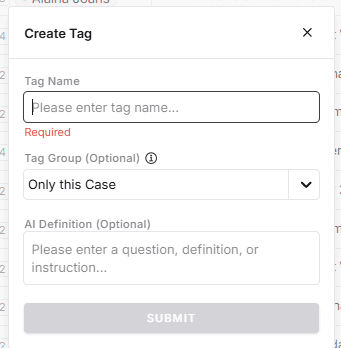
4. Write a specific definition in the "AI Definition (Optional)" box
This field is optional, but context and specificity helps. Don't assume the AI understands your case context.
Example Definition:
Tag documents containing racial or gender-based slurs, derogatory language, or discriminatory comments. Include: specific slurs (e.g. thug or ghetto), derogatory references to race, ethnicity, gender, or sexual orientation, stereotyping language, comments about physical appearance tied to protected characteristics, references to students or staff members using degrading terms, communications reflecting bias in evaluation or treatment decisions. Include contextual uses where the language is being reported, quoted, or discussed by witnesses, but flag documents where the alleged speaker is the author or participant in the conversation. Exclude: academic discussions of discriminatory language in curriculum contexts, historical documents, or policy materials defining prohibited conduct.
Concise Version of the Definition that will also work:
Tag any document containing or discussing derogatory, biased, or discriminatory language, including slurs such as "thug" or "ghetto," coded terms with similar meaning, or references to students or staff using demeaning descriptors. Include both direct use and quoted/reporting contexts. Exclude academic or policy materials that reference such language in a non-misconduct context.
Why this works: You're capturing direct use of prohibited language while also catching coded language, stereotyping, and bias that might not use explicit slurs. The definition distinguishes between the coach using the language versus witnesses reporting it—critical for understanding who said what. Exclusions prevent tagging policy documents in the set.
5. Click Submit
TensorCase analyzes your document set and tags relevant files.
Other Use Cases#
Climate/Culture Assessments#
Toxic Behavior Patterns
Tag systemic dysfunction: profanity, demeaning language, public criticism, threats (explicit or veiled), fear-based management references, turnover discussions, exit interview themes.
Reporting Failures
Identify concerns raised but not escalated: issues flagged "for awareness," complaints dismissed as "personality conflicts," unanswered HR intervention requests, reports with no follow-up.
Safety/Compliance Reviews#
Knowledge of Risk
Tag awareness of hazards before incidents: internal audits identifying deficiencies, deferred maintenance requests, cost-cutting discussions affecting compliance systems, sensor malfunction communications, monitoring gaps, regulatory warnings.
Deviation from Protocol
Identify shortcuts and workarounds: bypassing safety systems, skipped approval processes, verbal authorizations replacing required written sign-offs, references to "the fast way."