Generate Alternative Investigation Outcomes with One Prompt#
Need to stress-test your investigation conclusions? Want to understand how someone critiquing your investigation might reframe your findings? Looking to train your team on investigative bias and evidence interpretation?
This prompt instructs the AI to rewrite your investigation report to reach the opposite conclusion.
HOW IT WORKS#
Step 1: Navigate to a report drafting page and click the "AI" button, shown highlighted below. When you click, a "User Instruction" box will appear where you can paste in a prompt along with your draft report. See below:
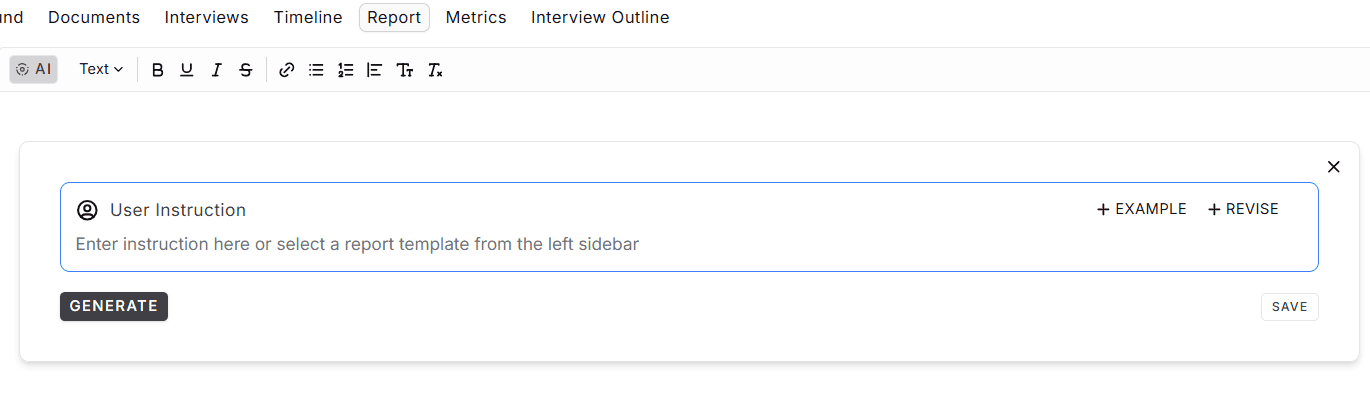
Step 2: Copy the complete prompt below (including <<<BEGIN REPORT>>> and <<<END REPORT>>>).
Step 3: Paste the prompt into the "User Instruction" box.
Step 4: Paste your full investigation report where indicated.
PROMPT:#
Rewrite the entire investigation report so that it reaches the opposite overall conclusion. Update all findings to align with that outcome.
- Reassess all evidence, including material not emphasized or cited in the original report.
- Highlight evidence and interview statements that point toward this alternative conclusion.
- Rebuild the narrative so it logically supports the new outcome from start to finish.
- Maintain a professional investigative tone, structure, and evidence-based reasoning.
- Do not comment on or reference the original conclusion.
- Ensure the summary, methodology, findings, analysis, and conclusion all support the new result.
<<<BEGIN REPORT>>>
`[paste your original investigation report]`
<<<END REPORT>>>
This approach gives you a rewrite showing how the same evidentiary record may be interpreted differently.